Tampilkan postingan dengan label MiniX. Tampilkan semua postingan

Video & Photo Gallery: Minix NEO Z64 Mini PC Hands-On, First impressions & Quick Review


Minix NEO Z64 Mini PC  is is another Intel Atom Z3735F mini PC pre-installed with Windows, like Voyo Mini PC.

BTW, you can buy from Minix NEO Z64 Win 8.1 Mini PC from www.cellphoneage.com for only US $166.98.
  
System Info and Windows Activation
I first went to System->About section to double check the system, and an Intel Atom Z3735F processor and 2GB RAM are indeed on the system, with Windows 8.1 with Bing 32-bit pre-installed. From the first boot I was prompted by the system to upgrade to Windows 10, which I did. Now legit Windows 10 Home edition is installed and activated on the machine. The build number is 10240 (latest stable build, not Fast Ring).


Storage Size & Speed
The Minix NEO Z64 Mini PC comes with 32GB eMMC. Under Windows 8.1 with Bing it was visible only 24,7 GB and 17GB of free space. Under Windows 10 Home the visible space is 28,8 GB and the free space is 21,2 GB, right after a clean installation. In CrystalDiskMark 5.0.2 the 32GB eMMC speed is good, the sequential read speed was 134.6 MB/s, and write speed 46.42 MB/s.  


Ethernet & Wifi speed
Minix Neo Z64 lacks the Gigabit Ethernet, but the 100M Ethernet does the job with over 90 Mbps in download and almost 96 Mbps in upload. The WiFi speed is much lower, since the Minix Neo Z64 is not Dual Band device, it only uses the 2,4 GHz band, so here we get only 31 Mbps in download and almost 18 Mbps in upload.


Drivers
In Windows 10 Home edition, all the drivers are properly installed. You can download Windows 10 drivers archive for Minix NEO Z64 Mini PC from here, here or here. (80 MB). 

Archive drivers content: AudioEndpoint, Battery, Bluetooth, CDROM, Computer, DiskDrive, Display, Firmware, HIDClass, Image, Keyboard, MEDIA, Monitor, Mouse, Net, Ports, PrintQueue, Processor, SCSIAdapter, SDHost, SoftwareDevice, System.


Here you can see the full photo gallery with test, Hands-On, First impressions & Quick Review. Here you’ll find the unboxing of Minix NEO Z64 Mini PC. If you need the BIOS file for this device you’ll find it here.


About Cellphoneage.com 
Founded in 2006, the company began by selling electronics products.
Address: Unit 1619, Metro Centre Phase 2, Lam Hing Street, Kowloon Bay, Hong Kong.


Don’t miss any of our future video tutorials, follow us on Youtube. Like us on Facebook. Add us in your circles on Google+. Watch our photo albums on Flickr. Subscribe now to our newsletter.

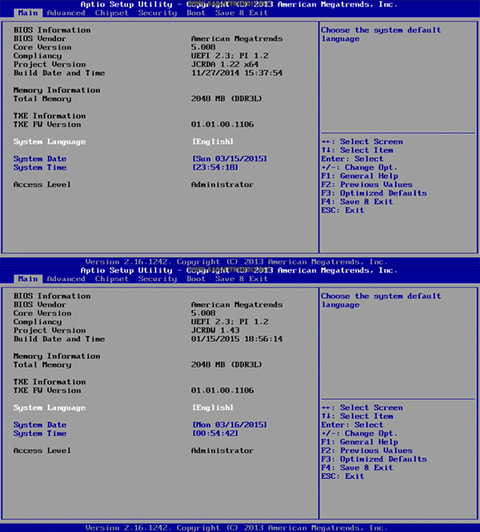
Minix Neo Z64 BIOS Settings


Cellphoneage.com just sent me a couple of weeks ago an amazing device to test and review: Minix NEO Z64 Win 8.1 Mini PC. Here you can find the unboxing of  Minix NEO Z64.

The American Megatrends BIOS of Minix Neo Z64 is one of the most complete among those available on Windows Mini PCs. It really has dozens of options not available on other products...

 
You can buy from Minix NEO Z64 Win 8.1 Mini PC from www.cellphoneage.com for only US $166.98. 

BTW, you can download Minix NEO Z64 BIOS from here, here or here. (5.4 MB)

Reflashing BIOS Procedure, which is very simple:
1. Choose the folder you need to perform the BIOS change (Andriod to Windows [this one should be wanted by most of you], OR Windows to Android [very rare I believe])
2. Copy all 4 files inside the selected folder to the root directory of your USB stick
3. During power up & boot up, hold down the F11 key on your keyboard
3. Choose "UEFI Shell" and hit enter to continue
4. BIOS re-flashing will then begin automatically
5. Re-flashing shall take a few minutes


Archive cotent:
- android-to-windows (fparts.txt, fpt64.efi, JCRDW143.BIN & startup.nsh)
- windows-to-android (fparts.txt, fpt.efi, JCRDA142.BIN & startup.nsh)

PLEASE BE PATIENT! DO NOT DISCONNECT POWER DURING THE PROCESS, OR YOUR UNIT WILL BE BRICKED (KILLING THE BIOS WHICH YOU CAN'T RESCUE).


For more details about Minix NEO Z64 BIOS settings please take a look at this video.

Don’t miss any of our future video tutorials, follow us on Youtube. Like us on Facebook. Add us in your circles on Google+. Watch our photo albums on Flickr. Subscribe now to our newsletter.

Download latest Firmware for Minix Neo X8 / X8 Plus / X8-H TV Boxes


Download 003 Firmware for Minix Neo X8 / X8 Plus / X8-H TV Boxes from here or hereFlash it using AMLogic USB Burning Tool v2.0.4.3 like in this tutorial. Download previous firmware from here. Download OTA update firmware from here or from here.


Firmware details
Archive name: X8_X8PLUS_X8H_FW007A_20150924
Archive size: 498 MB / 528 MB
Image: X8_X8PLUS_X8H_FW007A_20150924.zip & X8_X8PLUS_X8H_FW007A_20150924.img
Support: Amlogic S802
Build number: k200-user 4.4.2 KOT49H 20150924 release-keys


Changelog
1) Volume locked when passthrough mode is in use (removed in FW007A)
2) libstagefright security patches
3) Fixed YouTube livestream unable to play issue (fixed in FW007A)
4) Added simultaneous HDMI and analog audio switch
5) Added Ethernet to faked WiFi state option
6) Fixed SPDIF PCM no output issue
7) Fixed Vidon XBMC 3D playback issue. Latest Vidon XBMC apk.
8) Added RK remote app compatibility support. RK remote app.


Caution: Please do not update firmware unless you know what you are doing, you really want it or it is absolutely necessary. Firmware updates may occasionally have bad results, like bricking your device, temporarily or permanently. The firmware update process is done entirely at your own risk. Before attempting to update the firmware, back up your data. 


Don’t miss any of our future video tutorials, follow us on Youtube. Like us on Facebook. Add us in your circles on Google+. Watch our photo albums on Flickr. Subscribe now to our newsletter.


Download latest Android KitKat 4.4 for MINIX Neo X6 Mini TV Box


Download latest Android KitKat 4.4 for MINIX Neo X6 Mini TV Box from here or from here. Download previous version from here.


Firmware details
Archive name: X6_FW008_20150923
Archive file size: 1 GB
Firmware: X6_FW008_20150923.img & X6_FW008_20150923.zip

Platform: Amlogic S805 
Build number: 201-user 4.4.2 KOT49H 20150923 release-keys


Changelog
1) libstagefright security patches
2) Fixed YouTube livestream unable to play issue
3) Fixed Vidon XBMC 3D playback issue. Download Latest Vidon XBMC apk
4) Added RK remote app compatibility support [not including gaming mode]
5) Improve compatibility to some applications


Caution: Please do not update firmware unless you know what you are doing, you really want it or it is absolutely necessary. Firmware updates may occasionally have bad results, like bricking your device, temporarily or permanently. The firmware update process is done entirely at your own risk. Before attempting to update the firmware, back up your data. 


Don’t miss any of our future video tutorials, follow us on Youtube. Like us on Facebook. Add us in your circles on Google+. Watch our photo albums on Flickr. Subscribe now to our newsletter.

Video & Photo Gallery: Unboxing Minix NEO Z64 Win 8.1 Mini PC


Cellphoneage.com just sent me an amazing device to test and review: Minix NEO Z64 Win 8.1 Mini PC. Here we go with the unboxing of this beautiful and powerful device.

NEO Z64 Fanless Mini PC Windows 8.1 Edition is an ultra-compact mini desktop PC with huge possibilities. NEO Z64 redefines the desktop PC, with its minute form factor making it one of the world’s smallest desktop PCs that allows for an array of space saving options.

You can buy from Minix NEO Z64 Win 8.1 Mini PC from www.cellphoneage.com for only US $166.98.
  
The device feels solid and has real weight to it which I haven’t noticed in other devices, this makes the Z64 feel like a 'premium' device. The front of the device houses the power LED and IR sensor, although without an included remote. Moving around to the right of the device, we have the power button, microSD card slot and 2 USB 2.0 ports. Finally, the bulk of the ports are located at the rear. Moving from left to right, we have 3.5mm audio, HDMI out, Ethernet and DC In. A WiFi antenna also makes an appearance on the left side. The device also comes with CE, FCC and RoHS certification.


Minix NEO Z64 Specifications
Brand: MINIX
Model: NEO Z64
Color: Black
Material: Metal
Operating System: Windows 8.1 with Bing
CPU: Intel Z3735F 64bit
GPU: Intel HD Graphics
RAM: 2GB DDR3L
ROM: 32GB eMMC
Extended Storage: Micro SD card, up to 32GB
Communication: Wifi Connectivity 802.11n Wi-Fi, support hotspot sharing via WIFI + Ethernet 10 / 100Mbps
Video Supported: 1080P, AVI/MOV/MP4/RMVB/FLV/MKV
Audio Supported: MP3/WMA/WAV/APE/AAC/FLAC/OGG
Picture Supported: JPG, JPEG, BMP, GIF, etc.
Resolution: 1080P full HD
Power: DC 5V, 3A
Certification: CE,FCC certified
Dimension: 115 x 115 x 23mm
Weight:275g

Minix NEO Z64 Interfaces
1 x Standard HDMI female 1.4
2 x USB 2.0
1 x RJ45
1 x Micro SD card slot
1 x 3.5mm stereo jack

Package Content
1 x TV box
1 x HDMI cable
1 x Power adapter 
1 x User manual

Photo gallery full album here.


I'll be back soon these days with the first impression story, so stay close.


About Cellphoneage.com 
Founded in 2006, the company began by selling electronics products.
Address: Unit 1619, Metro Centre Phase 2, Lam Hing Street, Kowloon Bay, Hong Kong.


Don’t miss any of our future video tutorials, follow us on Youtube. Like us on Facebook. Add us in your circles on Google+. Watch our photo albums on Flickr. Subscribe now to our newsletter.

Download latest Firmware for Minix Neo X8 / X8 Plus / X8-H TV Boxes


Download 003 Firmware for Minix Neo X8 / X8 Plus / X8-H TV Boxes from here or here. Download previous firmware from here. Flash it using AMLogic USB Burning Tool v2.0.4.3 like in this tutorial.


Firmware details
Archive name: Minix NEO X8 X8-H Stock Firmware 172295 172292 20150518
Archive size: 373 MB
Image file name: aml_upgrade_package.img
Support: Amlogic S802


Caution: Please do not update firmware unless you know what you are doing, you really want it or it is absolutely necessary. Firmware updates may occasionally have bad results, like bricking your device, temporarily or permanently. The firmware update process is done entirely at your own risk. Before attempting to update the firmware, back up your data. 


Don’t miss any of our future video tutorials, follow us on Youtube. Like us on Facebook. Add us in your circles on Google+. Watch our photo albums on Flickr. Subscribe now to our newsletter.


Download 003 Firmware for Minix Neo X8 / X8 Plus / X8-H TV Boxes


Download 003 Firmware for Minix Neo X8 / X8 Plus / X8-H TV Boxes from here or here. Download previous firmware from here. Flash it using AMLogic USB Burning Tool v2.0.4.3 like in this tutorial.


Archive name: X8_X8PLUS_X8H_003FW
Archive size: 430 MB
Image file name: X8_X8PLUS_X8H_20150205.img
Support: Amlogic S802-H

Changelog:
- Fixed Ethernet MAC address reading error bug
- Fixed can't switch to 4K bug (2014 Samsung "ready for future" TVs must use 

- HDMI port 3 - MHL port, other ports have been found to have compatibility issues)
- Fixed HDMI-CEC wakeup issue
- Fixed Vietnam htvonlinetv bug
- Fixed Bluetooth failed to re-connect bug
- Added self-adaptive refresh rate switching option (no need to enable switching inside of XBMC anymore)- Fixed some 25fps videos playback stuttering issue
- Fixed eurosport app keep loading issue
- Fixed "Saint Seiya MP4" kind of playback stuttering issue
- Improved HDMI passthrough compatibility with some older TVs
- Fixed Indonesia TV Plus app playback quality issue
- Fixed TV Radio Malaysia app playback quality issue
- Fixed Indonesia Lumen app playback quality issue
- Channel 13 patch removed
- Re-enabling AML remote controller option

Download latest Android KitKat stock firmware for Minix Neo X8-H Plus TV Box


Download latestAndroid KitKat stock firmware for Minix Neo X8-H Plus TV Box from here or here. Download previous firmware from here. Download another Minix firmware from here. To flash the firmware on this box from PC via AMLogic USB Burning Tool read this article.


Archive name: X8H_PLUS_003FW
Archive size: 431 MB
Image file name: X8H_Plus_20150206.img
Support: Amlogic S812
Release date: 07/02/2015


Changelog:
- Fixed Ethernet MAC address reading error bug
- Fixed can't switch to 4K bug (2014 Samsung "ready for future" TVs must use 

- HDMI port 3 - MHL port, other ports have been found to have compatibility issues)
- Fixed HDMI-CEC wakeup issue
- Fixed Vietnam htvonlinetv bug
- Fixed Bluetooth failed to re-connect bug
- Added self-adaptive refresh rate switching option (no need to enable switching inside of XBMC anymore)- Fixed some 25fps videos playback stuttering issue
- Fixed eurosport app keep loading issue
- Fixed "Saint Seiya MP4" kind of playback stuttering issue
- Improved HDMI passthrough compatibility with some older TVs
- Fixed Indonesia TV Plus app playback quality issue
- Fixed TV Radio Malaysia app playback quality issue
- Fixed Indonesia Lumen app playback quality issue
- Channel 13 patch removed
- Re-enabling AML remote controller option

The Minix NEO Z64 Intel TV Box goes now on sale

The Minix NEO Z64 Intel TV Box will go on sale at GeekBuying.com


There are two versions are available, with the same hardware specs:
Minix NEO Z64A (Android 4.4.4 pre-installed, classic green package) – 144.9$ or 121.95€
Minix NEO Z64W (Win 8.1 with Bing pre-installed, windows blue package) – 174.9$ or 147.2€


Minix NEO Z64 Specifications
Brand: MINIX
Model: NEO Z64A / NEO Z64W
Color: Black
Material: Plastic
Operating System: Android 4.4 / Windows 8.1 with Bing
CPU: Intel Z3735F 64-BIT
GPU: Intel HD Graphics
RAM: 2GB DDR3L
ROM: 32GB eMMC
Extended Storage: Micro SD card, up to 32GB
Communication: Wifi Connectivity 802.11n Wi-Fi, support hotspot sharing via WIFI + Ethernet 10 / 100Mbps
Video Supported: 1080P, AVI/MOV/MP4/RMVB/FLV/MKV
Audio Supported: MP3/WMA/WAV/APE/AAC/FLAC/OGG
Picture Supported: JPG, JPEG, BMP, GIF, etc.
Resolution: 1080P full HD
Interfaces: Standard HDMI female, 1.4, 2 x USB 2.0; 1 x RJ45;1 x Micro SD card slot;1 x 3.5mm steteo jack;
Power: DC 5V,3A
Certification: CE,FCC,certified
Dimension: 115 x 115 x 23mm
Weight:275g

Package Contents
1 x TV box
1 x IR remote control
1 x HDMI cable
1 x Power adapter (A right AC Adapter will be sent as your shipping country)
1 x User manual